Normalization
From Sequence, press n to compare the input with its NFC, NFD, NFKC, and NFKD normalized forms.
sauva 'Á①ffi'
Forms
| Form | Transformation |
|---|---|
| NFC | Canonical decomposition followed by canonical composition |
| NFD | Canonical decomposition |
| NFKC | Compatibility decomposition followed by canonical composition |
| NFKD | Compatibility decomposition |
Canonical normalization handles equivalent representations, such as a precomposed accented letter and a letter followed by a combining mark. Compatibility normalization also converts characters such as circled digits and ligatures, and can remove distinctions in their original presentation. See Unicode Normalization Forms for the specification.
Examples of individual transformations:
| Input | Form | Result |
|---|---|---|
A + U+0301 | NFC | Á (U+00C1) |
Á (U+00C1) | NFD | A + U+0301 |
① (U+2460) | NFKC | 1 (U+0031) |
ffi (U+FB03) | NFKD | ffi |
Comparison
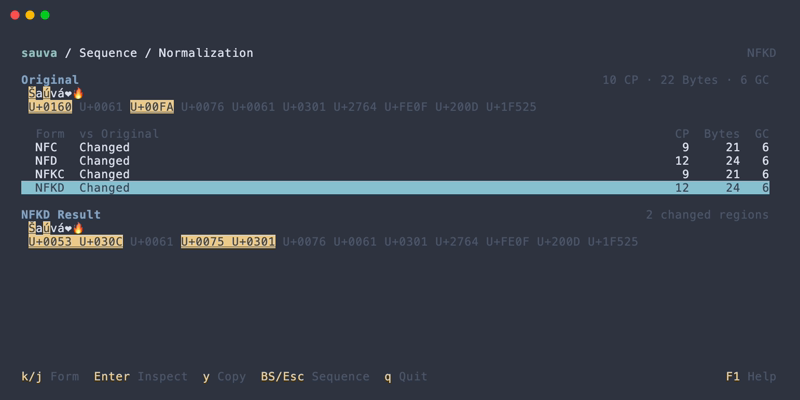
The comparison screen shows:
- The original text and its code point sequence.
- Whether each form changes the input.
- Code point (
CP), UTF-8 byte (Bytes), and grapheme cluster (GC) counts for each form. - The selected form's result, code point sequence, and number of changed regions.
Changed regions use the configured difference colors and underlining. Spaces and invisible characters are represented with display aids; the copied result contains the actual normalized text.
Inspect a Result
Each normalized result can be opened as a code point list.
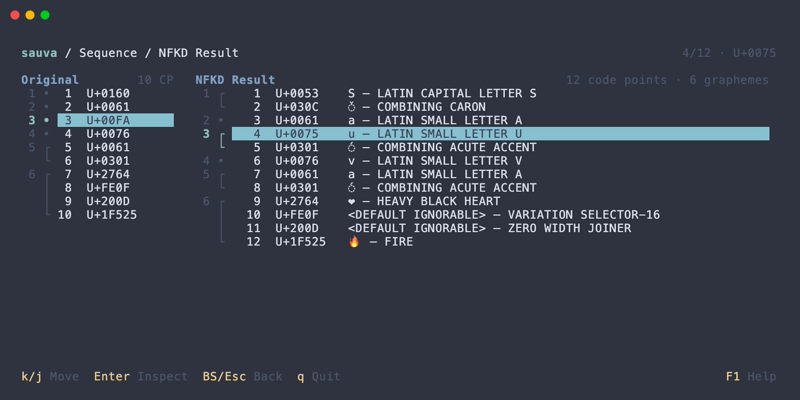
The result is shown alongside the original code point list. As you select a result code point, the corresponding region in the original is highlighted and brought into view. This makes compositions and expansions easier to follow.
Result code points can be opened in the Inspector to read their properties.
Copying
Quick copying from form comparison takes the whole normalized result as text. The copy dialog offers other formats and, from the result list, code point and grapheme cluster targets.
Operations
| Keys | In form comparison | In a result list |
|---|---|---|
| Up / Down | Select a form | Select a code point |
| Enter | Open the selected result | Open the selected code point in the Inspector |
| y | Copy the whole normalized result | — |
| Y | Open the copy dialog for the whole result | Open the copy dialog |
| Esc | Return to the original sequence | Return to form comparison |
Backspace in the Inspector returns to the result list.
See Keybindings for all comparison, result list, and copy dialog controls.