Inspector
The Inspector shows the properties of one Unicode code point. Open it at startup with a character or code point argument, or select a code point from Search, Browse, Bookmarks, or Sequence.
sauva あ
sauva U+2192
Properties
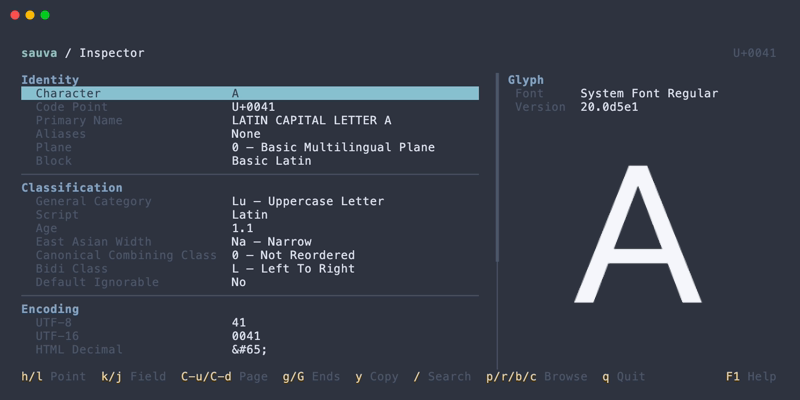
The Inspector starts in Relevant mode.
| Section | Fields |
|---|---|
| Identity | Character, Code Point, Primary Name, Aliases, Plane, Block |
| Classification | General Category, Script, Age, East Asian Width, Canonical Combining Class, Bidi Class, Default Ignorable |
| Case | Uppercase Mapping, Lowercase Mapping, Titlecase Mapping, Case Folding |
| Numeric | Numeric Type, Numeric Value |
| Encoding | UTF-8, UTF-16, HTML Decimal, HTML Hex, Rust char, Unicode Escape |
| Normalization | Decomposition Type, Decomposition |
| Data | Unicode Version |
In Relevant mode:
- Aliases, Decomposition Type, and Decomposition appear only when present. Empty sections are omitted.
- Canonical Combining Class appears for combining marks, including those with a value of
0, and for any code point with a nonzero value. - Default Ignorable appears only when its value is
Yes. - Case fields appear only when their mapping differs from the selected code point.
- Numeric Type and Numeric Value appear together when a numeric value exists, including
0. - Encoding shows the available representations. For surrogates, it shows one explanation instead of unavailable fields.
The remaining fields are always shown, including default values for unassigned code points. All mode shows every field, including None, No, 0, and unavailable values. Unchanged case mappings show the selected code point itself. Code points without a numeric value show Numeric Type None and Numeric Value NaN.
Some useful distinctions:
- Age is the Unicode version in which the character was introduced. Unicode Version is the version of Sauva's bundled data.
- Aliases lists formal Unicode name aliases and their types. These aliases can also be searched.
- East Asian Width is a Unicode property. Actual terminal cell width also depends on the terminal and its rendering rules.
- Case shows full Unicode mappings as code points and names, including mappings to multiple characters such as
ß→SS. These are the default mappings for a single code point; language-specific and context-dependent rules are not applied. Case Folding shows the default full mapping used for caseless matching. - Numeric Type distinguishes
Decimal,Digit, andNumeric. Numeric Value preserves exact integers and fractions, such as0,4, and1/2, including values for numeric ideographs. - Decomposition shows the character's Unicode decomposition mapping. To compare the normalized forms of a string, use Normalization from Sequence.
The glyph panel renders the selected code point and shows the font used, when space is available. See Glyph Preview for font settings and special cases.
Property Explanations
Property explanations cover a property's meaning, possible values or format, notes, and a specification reference. Explanations are bundled with Sauva and can be read offline, including for unavailable values shown in All mode.
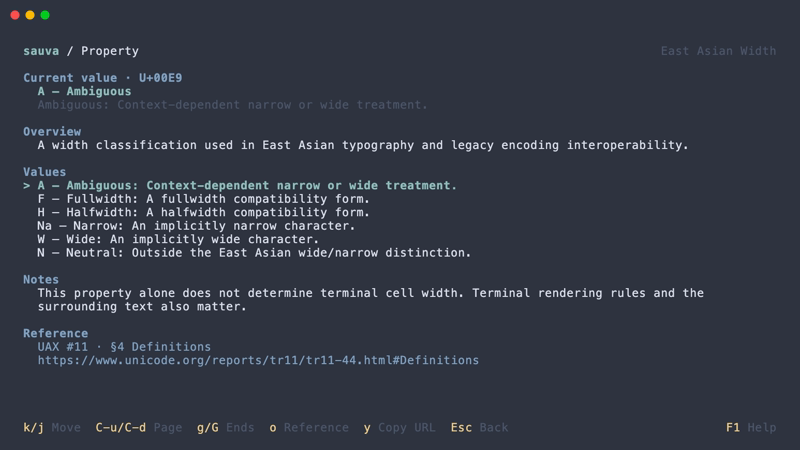
Specification references can be opened in your default browser or copied as URLs.
Copying Values
The selected property value can be copied to the system clipboard. Selecting Character copies the actual character, including invisible characters and combining marks. Display aids such as a dotted circle or a <SPACE> label are not included in that value.
Unavailable values, such as an encoding for a surrogate, cannot be copied. A status message reports whether copying succeeded or why it failed.
Case mappings copy the displayed code points and names, preserving their order and repeated characters. Numeric Value copies its exact number or fraction; NaN cannot be copied.
The copy dialog copies the current code point in a chosen format, independently of the selected property.
Special Code Points
Sauva can inspect the full code point range, including unassigned code points, private-use characters, and surrogates.
Surrogates are not Unicode scalar values, so UTF-8 / UTF-16 encodings and character images are unavailable for them. Empty or invisible characters may have property data without visible pixels in the preview.
Operations
| Keys | Action |
|---|---|
| Left / Right | Inspect the previous / next code point |
| Up / Down | Select a property |
| e | Open the selected property's explanation |
| y | Copy the selected property value |
| Y | Open the copy dialog for the current code point |
| a | Toggle Relevant / All properties |
| / | Open Search |
| p, r, b, c | Open Browse at the corresponding level |
| m / M | Toggle a bookmark / open Bookmarks |
| Backspace | Return to the bookmark list or sequence that opened the Inspector |
Adjacent navigation follows code point values, even when the Inspector was opened from a sequence.
See Keybindings for all Inspector and property explanation controls.