Search
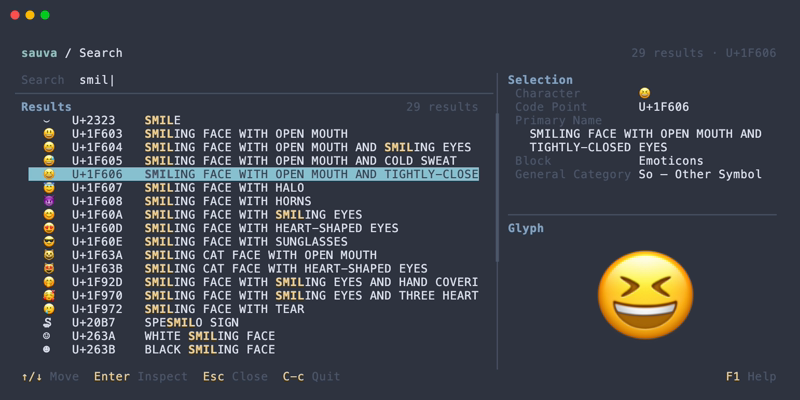
Press / in the Inspector to search by character, code point, Unicode name, or formal name alias.
Queries
Results update as the query changes.
| Query | Behavior |
|---|---|
あ | Find the literal character |
A | Find the letter A |
U+2192 | Find that code point |
U+A | Find U+000A |
2192 | Find that code point and matching names or aliases |
arrow | Match Unicode names and formal aliases containing the query |
LF | Find matching formal aliases and names |
Surrounding ASCII whitespace is removed from a search query. Name and alias matching ignores ASCII case and normalizes runs of ASCII whitespace to a single space.
A U+ prefix explicitly selects code point notation and accepts one to six hexadecimal digits. A bare hexadecimal query is interpreted as notation only when it contains four to six digits; its name and alias matches are included as well.
Search notation differs from command line input: the search field does not recognize the 0x prefix, and a query such as 41 searches names and aliases. Use U+0041 for an unambiguous code point query.
Invalid U+ notation and out-of-range code points display an error. A valid query with no matching results displays an empty result list.
Result Order
Direct character or code point matches appear first. Name and alias matches follow, ordered by exact match, prefix match, and substring match. For equal match types, primary name matches precede alias matches, and code point order breaks remaining ties.
A code point appears only once even if both its name and an alias match. Matching text is highlighted.
Operations
| Keys | Action |
|---|---|
| Character keys | Edit the query |
| Up / Down | Select a result |
| Enter | Open the selected result in the Inspector |
| Esc | Close Search and return to the Inspector |
See Keybindings for all Search controls.