Introduction
Serie (/zéːriə/) is a TUI application that uses the terminal emulators' image display protocol to render commit graphs like git log --graph --all.
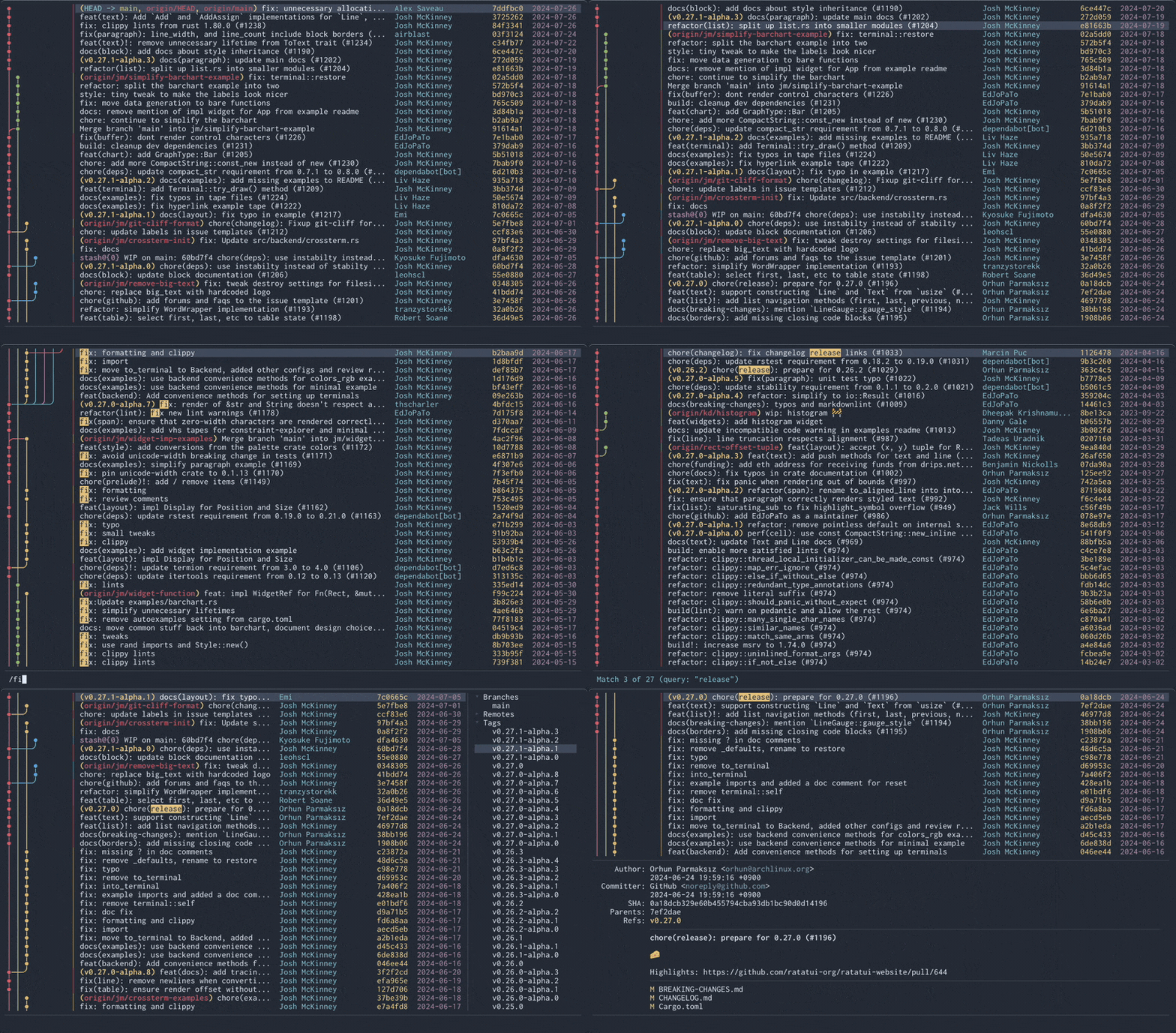
(This demo shows Ratatui repository!)
Why?
While some users prefer to use Git via CLI, they often rely on a GUI or feature-rich TUI to view commit logs. Others may find git log --graph sufficient.
Personally, I found the output from git log --graph difficult to read, even with additional options. Learning complex tools just to view logs seemed cumbersome.
Goals
- Provide a rich
git log --graphexperience in the terminal. - Offer commit graph-centric browsing of Git repositories.
Non-Goals
- Implement a fully-featured Git client.
- Create a TUI application with a complex UI.
- Works in any terminal environment.
Built with Rust and ratatui.
Serie is available on GitHub under the MIT license.
Getting Started
Requirements
- Git
- Supported terminal emulator
- Refer to Compatibility for details.
Installation
Cargo
$ cargo install --locked serie
Arch Linux
$ pacman -S serie
Homebrew
$ brew install serie
or from tap:
$ brew install lusingander/tap/serie
NetBSD
$ pkgin install serie
Downloading binary
You can download pre-compiled binaries from releases.
Build from source
If you want to check the latest development version, build from source:
$ git clone https://github.com/lusingander/serie.git
$ cd serie
$ cargo build --release # Unless it's a release build, it's very slow.
$ ./target/release/serie
Basic Usage
Run serie in the directory where your git repository exists.
$ cd <your git repository>
$ serie
If you want to specify it using command line options, see Command Line Options.
Command Line Options
-n, --max-count <NUMBER>
Maximum number of commits to render.
If not specified, all commits will be rendered.
It behaves similarly to the --max-count option of git log.
-p, --protocol <TYPE>
A protocol type for rendering images of commit graphs.
Possible values: auto, iterm, kitty, kitty-unicode
By default auto will guess the best supported protocol for the current terminal (if listed in Supported terminal emulators).
-o, --order <TYPE>
Commit ordering algorithm.
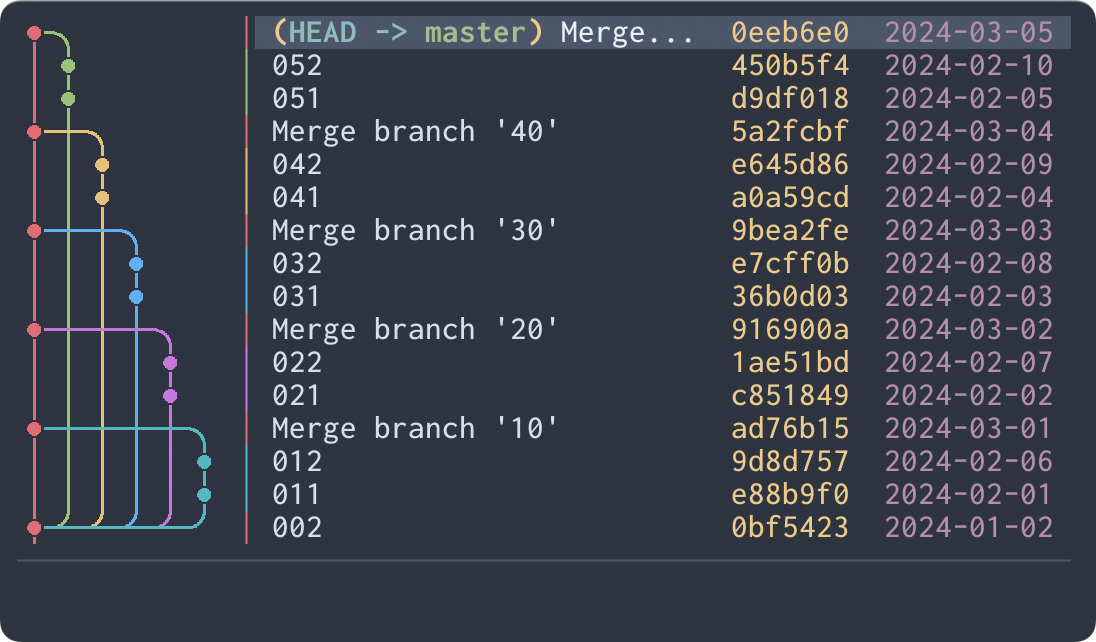
Possible values: chrono, topo
chrono will order commits by commit date if possible.
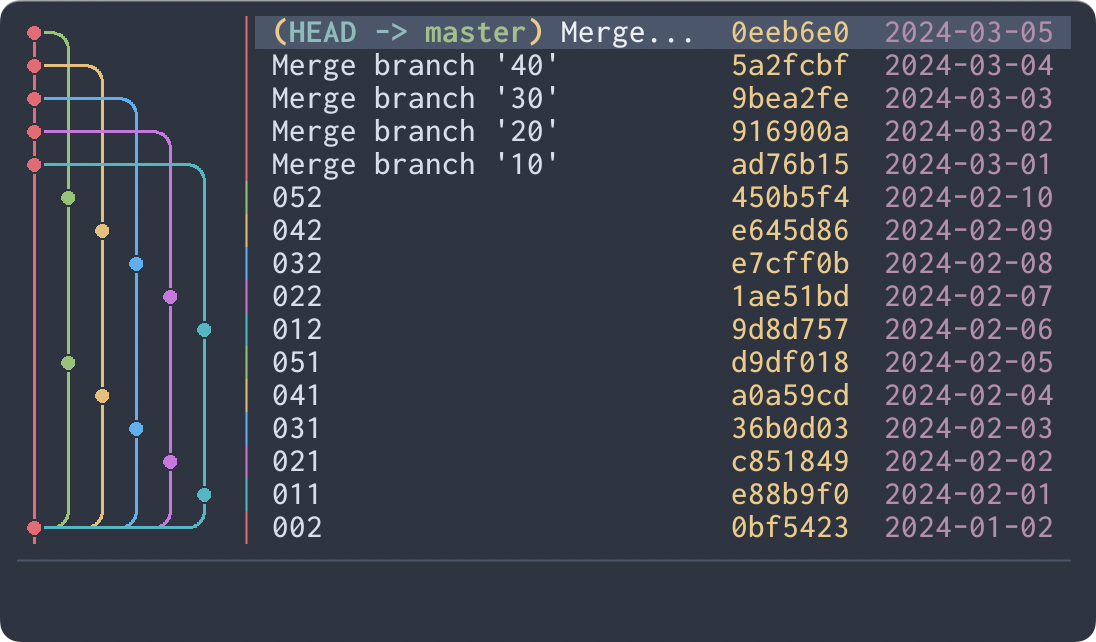
topo will order commits on the same branch consecutively if possible.
-g, --graph-width <TYPE>
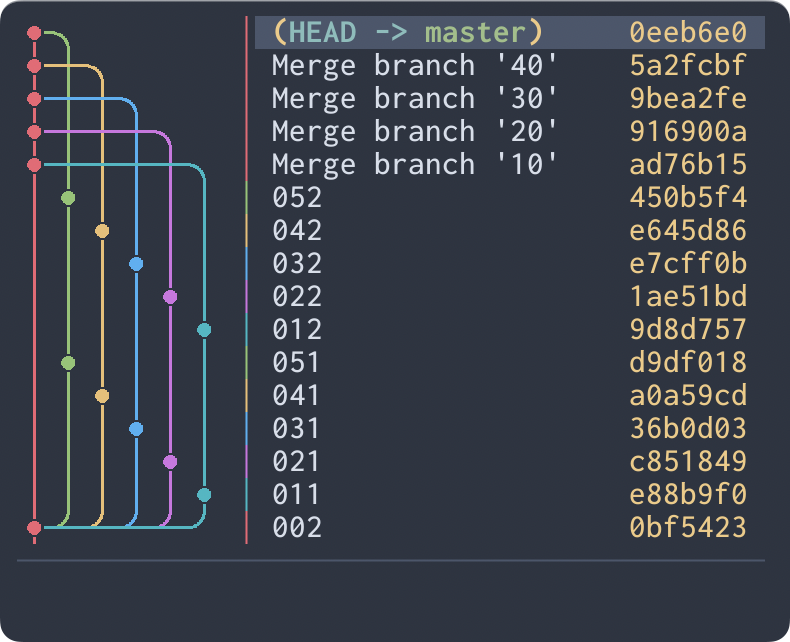
The character width that a graph image unit cell occupies.
Possible values: auto, double, single
If not specified or auto is specified, double will be used automatically if there is enough width to display it, single otherwise.
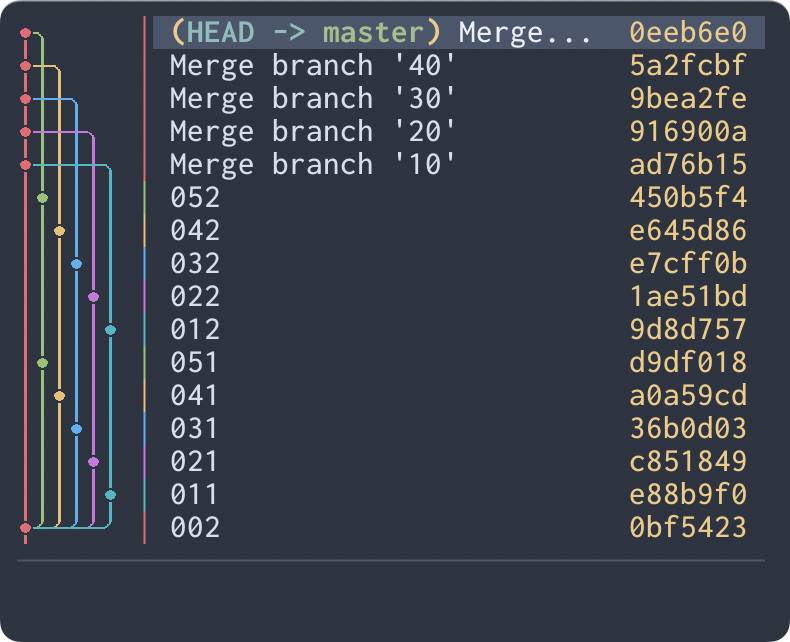
-s, --graph-style <TYPE>
The commit graph image edge style.
Possible values: rounded, angular
rounded will use rounded edges for the graph lines.
angular will use angular edges for the graph lines.
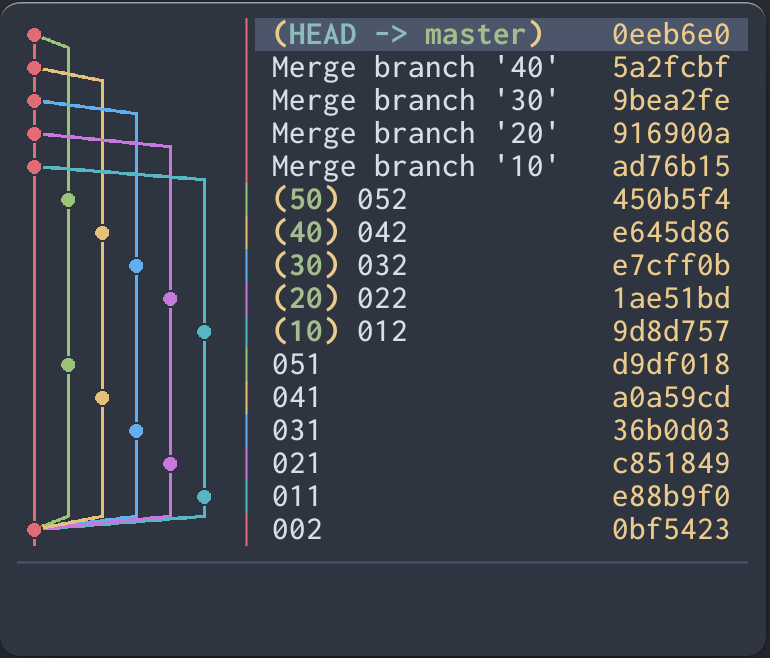
-i, --initial-selection <TYPE>
The initial selection of commit when starting the application.
Possible values: latest, head
latest will select the latest commit.
head will select the commit at HEAD.
-b, --primary-branch <BRANCH>
The primary branch to keep on the leftmost column.
When specified, Serie preserves the first-parent commit spine of the specified branch along the leftmost column, displaying other branches in subsequent columns even if they contain newer commits.
Compatibility
Supported terminal emulators
These image protocols are supported:
- Inline Images Protocol (iTerm2)
- Terminal graphics protocol (kitty)
- Supports both the existing graphics protocol mode and the Unicode placeholder mode.
The terminals on which each has been confirmed to work are listed below.
Inline Images Protocol
| Terminal emulator | Note |
|---|---|
| iTerm2 | But slower than other terminals |
| WezTerm | |
| Rio | |
| VSCode integrated terminal * | Requires the terminal.integrated.enableImages setting to be enabled |
*Not only the VSCode integrated terminal, but any terminal emulator using xterm.js may basically work in the same way as long as image display feature is enabled.
Terminal graphics protocol
Rendering using Unicode Placeholder is available by explicitly specifying kitty-unicode as protocol option or config.
Partially supported environments
- tmux is supported only when using the kitty Unicode placeholder protocol.
- Requires
set -g allow-passthrough onin tmux.conf (version 3.2+).
- Requires
Unsupported environments
- Sixel graphics is not supported.
- Other terminal multiplexers (screen, Zellij, etc.) other than those listed in Partially supported environments are not supported.
- Windows is not officially supported. Please refer to the related issue.
Configurations
You can use config.toml to configure various aspects of your application.
Config files are loaded in the following order of priority:
$SERIE_CONFIG_FILE- If
$SERIE_CONFIG_FILEis set but the file does not exist, an error occurs.
- If
$XDG_CONFIG_HOME/serie/config.toml- If
$XDG_CONFIG_HOMEis not set,~/.config/will be used instead.
- If
If the config file does not exist, the default values will be used for all items. If the config file exists but some items are not set, the default values will be used for those unset items.
Config File Format
Example
[core.option]
protocol = "auto"
order = "chrono"
graph_width = "auto"
graph_style = "rounded"
initial_selection = "latest"

[core.git]
mailmap = false

[core.search]
target = "all"
ignore_case = false
fuzzy = false

[core.user_command]
commands_1 = { name = "git diff", commands = ["git", "--no-pager", "diff", "--color=always", "{{first_parent_hash}}", "{{target_hash}}"]}
tab_width = 4

[core.external]
clipboard = "auto"

[ui.common]
cursor_type = "native"

[ui.list]
scrolloff = 0
columns = ["graph", "marker", "subject", "name", "hash", "date"]
subject_min_width = 20
date_format = "%Y-%m-%d"
date_width = 10
date_local = true
name_width = 20

[ui.detail]
height = 20
date_format = "%Y-%m-%d %H:%M:%S %z"
date_local = true

[ui.user_command]
height = 20

[ui.refs]
width = 26

[graph]
row_image_width = "compact"

[graph.color]
branches = [
  "#E06C76",
  "#98C379",
  "#E5C07B",
  "#61AFEF",
  "#C678DD",
  "#56B6C2",
]
edge = "#00000000"
background = "#00000000"

[color]
fg = "reset"
bg = "reset"
list_selected_fg = "white"
list_selected_bg = "dark-gray"
list_ref_paren_fg = "yellow"
list_ref_branch_fg = "green"
list_ref_remote_branch_fg = "red"
list_ref_tag_fg = "yellow"
list_ref_stash_fg = "magenta"
list_head_fg = "cyan"
list_subject_fg = "reset"
list_name_fg = "cyan"
list_hash_fg = "yellow"
list_date_fg = "magenta"
list_match_fg = "black"
list_match_bg = "yellow"
detail_label_fg = "reset"
detail_name_fg = "reset"
detail_date_fg = "reset"
detail_email_fg = "blue"
detail_hash_fg = "reset"
detail_ref_branch_fg = "green"
detail_ref_remote_branch_fg = "red"
detail_ref_tag_fg = "yellow"
detail_file_change_add_fg = "green"
detail_file_change_modify_fg = "yellow"
detail_file_change_delete_fg = "red"
detail_file_change_move_fg = "magenta"
ref_selected_fg = "white"
ref_selected_bg = "dark-gray"
help_block_title_fg = "green"
help_key_fg = "yellow"
virtual_cursor_fg = "reset"
status_input_fg = "reset"
status_input_transient_fg = "dark-gray"
status_info_fg = "cyan"
status_success_fg = "green"
status_warn_fg = "yellow"
status_error_fg = "red"
divider_fg = "dark-gray"

[keybind]
# See the separate Custom Keybindings section for details.
# ...
Configuration Options
core.option.protocol
The protocol type for rendering images of commit graphs.
- type:
string(enum) - default:
auto - possible values:
autoitermkittykitty-unicode
The value specified in the command line argument takes precedence.
core.option.order
The commit ordering algorithm.
- type:
string(enum) - default:
chrono - possible values:
chronotopo
The value specified in the command line argument takes precedence.
core.option.graph_width
The character width that a graph image unit cell occupies.
- type:
string(enum) - default:
auto - possible values:
autodoublesingle
The value specified in the command line argument takes precedence.
core.option.graph_style
The commit graph image edge style.
- type:
string(enum) - default:
rounded - possible values:
roundedangular
The value specified in the command line argument takes precedence.
core.option.initial_selection
The initial selection of commit when starting the application.
- type:
string(enum) - default:
latest - possible values:
latesthead
The value specified in the command line argument takes precedence.
core.git.mailmap
Whether to resolve author and committer identities through the repository's .mailmap file.
- type:
boolean - default:
false
When enabled, names and emails are displayed as mapped by .mailmap, in the same way as git log and git shortlog. Repositories without a .mailmap file are unaffected.
graph.row_image_width
The width mode for each graph row image.
- type:
string(enum) - default:
compact - possible values:
compact: trim each row image to the minimum required graph width- Reduces the file size for more lightweight operation. If you are using
kitty-unicodeprotocol, it helps you avoid hitting the image transfer size limit.
- Reduces the file size for more lightweight operation. If you are using
fixed: use the same full graph width for every row image- This can be used when you want to set a background color for graphs in environments that cannot correctly handle transparent images, or in environments where rendering does not work well when there are images of various widths.
core.search.target
The field to search when the application starts. The target can be toggled while the commit list is displayed.
- type:
string(enum) - default:
all - possible values:
all: Search refs, commit subjects, author names, and short commit hashessubject: Search commit subjectsauthor: Search author namesref: Search branch, remote branch, and tag nameshash: Search short commit hashes
core.search.ignore_case
Whether to enable ignore case when the application starts. The option can be toggled while the commit list is displayed.
- type:
boolean - default:
false
core.search.fuzzy
Whether to enable fuzzy matching when the application starts. The option can be toggled while the commit list is displayed.
- type:
boolean - default:
false
core.user_command.commands_{n}
The command definition for executing external commands.
Multiple commands can be specified in the format commands_{n}.
For details about user command, see the separate User command section.
- type:
object - fields:
name:string- The name of the user command.type:string(enum) - The type of user command.- default:
inline - possible values:
inline: Display the output of the command in the user command view.silent: Execute the command in the background without opening a view.suspend: Execute the command by suspending the application. This is useful for interactive commands.
- default:
commands:array of strings- The command and its arguments.refresh:boolean- Whether to reload the repository and refresh the display after executing the command. Available forsilentandsuspendcommands.- default:
false
- default:
- examples:
commands_1 = { name = "git diff", commands = ["git", "--no-pager", "diff", "--color=always", "{{first_parent_hash}}", "{{target_hash}}"]}commands_2 = { name = "delete branch", type = "silent", commands = ["git", "branch", "-D", "{{branches}}"], refresh = true }commands_3 = { name = "amend commit", type = "suspend", commands = ["git", "commit", "--amend"], refresh = true }
core.user_command.tab_width
The number of spaces to replace tabs in the user command output.
- type:
u16 - default:
4
core.external.clipboard
The clipboard command to use for copy operations.
- type:
object(enum) - default:
auto - possible values:
auto: Use the default clipboard library{ custom = { commands = ["..."] } }: Use a custom command that receives text via stdincommands:array of strings- The command and its arguments.
- examples:
clipboard = "auto"clipboard = { custom = { commands = ["wl-copy"] } }clipboard = { custom = { commands = ["xclip", "-selection", "clipboard"] } }
ui.common.cursor_type
The type of a cursor to display in the input.
- type:
object(enum) - default:
native - possible values:
native: Use the terminal native cursor.{ virtual = "|" }: Use a virtual cursor with the specified string.- value:
string- The string to display as the virtual cursor.
- value:
ui.list.scrolloff
The minimum number of visible rows to keep above and below the selected commit where possible.
- type:
u16 - default:
0
ui.list.columns
The order and visibility of columns in the commit list.
- type:
array of strings(enum) - default:
["graph", "marker", "subject", "name", "hash", "date"] - possible values:
graphmarkersubjectnamehashdate
ui.list.subject_min_width
The minimum width of a subject in the commit list.
- type:
u16 - default:
20
ui.list.date_format
The date format of a author date in the commit list.
- type:
string - default:
"%Y-%m-%d"
The format must be specified in strftime format. https://docs.rs/chrono/latest/chrono/format/strftime/index.html
ui.list.date_width
The width of a author date in the commit list.
- type:
u16 - default:
10
ui.list.date_local
Whether to show a author date in the commit list in local timezone.
- type:
boolean - default:
true
ui.list.name_width
The width of a author name in the commit list.
- type:
u16 - default:
20
ui.detail.height
The height of a commit detail area.
- type:
u16 - default:
20
ui.detail.date_format
The date format of a author/committer date in the commit detail.
- type:
string - default:
"%Y-%m-%d %H:%M:%S %z"
The format must be specified in strftime format. https://docs.rs/chrono/latest/chrono/format/strftime/index.html
ui.detail.date_local
Whether to show a author/committer date in the commit list in local timezone.
- type:
boolean - default:
true
ui.user_command.height
The height of a user command area.
- type:
u16 - default:
20
ui.refs.width
The width of a refs list area.
- type:
u16 - default:
26
graph.color.branches
Array of colors used for the commit graph.
- type:
array of strings - default:
"#E06C76""#98C379""#E5C07B""#61AFEF""#C678DD""#56B6C2"
Colors should be specified in the format #RRGGBB or #RRGGBBAA.
graph.color.edge
Color of the edge surrounding the commit circles in the graph.
- type:
string - default:
"#00000000"
Colors should be specified in the format #RRGGBB or #RRGGBBAA.
graph.color.background
Background color of the commit graph.
- type:
string - default:
"#00000000"
Colors should be specified in the format #RRGGBB or #RRGGBBAA.
color
The colors of each element of the application.
Note: Graph colors are specified with [graph.color].
- type:
string - default: see the example above
Colors should be specified in one of the following formats:
- ANSI color name
"red","bright-blue","light-red","reset", ...
- 8-bit color (256-color) index values
"34","128","255", ...
- 24-bit true color hex codes
"#abcdef", ...
keybind
Key bindings for various actions in the application.
See the separate Custom Keybindings section for details.
Keybindings
You can see the keybindings by pressing the ? key.
The default key bindings can be overridden.
List of all default keybindings
Common
| Key | Description | Corresponding keybind |
|---|---|---|
| Ctrl-c q | Quit app | force_quit quit |
| ? F1 | Open help | help_toggle |
Commit List
| Key | Description | Corresponding keybind |
|---|---|---|
| Down/Up j/k | Move down/up | navigate_down navigate_up |
| J/K | Move down/up | select_down select_up |
| Alt-Down Alt-j | Move to parent commit | go_to_parent |
| g/G | Go to top/bottom | go_to_top go_to_bottom |
| Ctrl-f/b | Scroll page down/up | page_down page_up |
| Ctrl-d/u | Scroll half page down/up | half_page_down half_page_up |
| Ctrl-e/y | Scroll down/up | scroll_down scroll_up |
| H/M/L | Select top/middle/bottom of the screen | select_top select_middle select_bottom |
| Enter | Show commit details Apply search (if searching) | confirm |
| Tab | Open refs list | ref_list |
| / | Start search | search |
| Esc | Cancel search | cancel |
| n/N | Go to next/previous search match | go_to_next go_to_previous |
| Ctrl-t | Toggle search target | search_target_toggle |
| Ctrl-g | Toggle ignore case | ignore_case_toggle |
| Ctrl-x | Toggle fuzzy match | fuzzy_toggle |
| R | Refresh | refresh |
| c/C | Copy commit short/full hash | short_copy full_copy |
| d | Toggle custom user command view | user_command_1 |
Commit Detail
| Key | Description | Corresponding keybind |
|---|---|---|
| Esc Backspace | Close commit details | close cancel |
| Down/Up j/k | Scroll down/up | navigate_down navigate_up |
| Ctrl-f/b | Scroll page down/up | page_down page_up |
| Ctrl-d/u | Scroll half page down/up | half_page_down half_page_up |
| g/G | Go to top/bottom | go_to_top go_to_bottom |
| J/K | Select older/newer commit | select_down select_up |
| Alt-Down Alt-j | Select parent commit | go_to_parent |
| R | Refresh | refresh |
| c/C | Copy commit short/full hash | short_copy full_copy |
| d | Toggle custom user command view | user_command_1 |
Refs List
| Key | Description | Corresponding keybind |
|---|---|---|
| Esc Backspace Tab | Close refs list | close cancel ref_list |
| Down/Up j/k | Move down/up | navigate_down navigate_up |
| J/K | Move down/up | select_down select_up |
| g/G | Go to top/bottom | go_to_top go_to_bottom |
| Right/Left l/h | Open/Close node | navigate_right navigate_left |
| R | Refresh | refresh |
| c | Copy ref name | short_copy |
User Command
| Key | Description | Corresponding keybind |
|---|---|---|
| Esc Backspace | Close user command | close cancel |
| Down/Up j/k | Scroll down/up | navigate_down navigate_up |
| J/K | Scroll down/up | select_down select_up |
| Ctrl-f/b | Scroll page down/up | page_down page_up |
| Ctrl-d/u | Scroll half page down/up | half_page_down half_page_up |
| g/G | Go to top/bottom | go_to_top go_to_bottom |
| J/K | Select older/newer commit | select_down select_up |
| Alt-Down Alt-j | Select parent commit | go_to_parent |
| R | Refresh | refresh |
Help
| Key | Description | Corresponding keybind |
|---|---|---|
| Esc Backspace ? F1 | Close help | close cancel help_toggle |
| Down/Up j/k | Scroll down/up | navigate_down navigate_up |
| J/K | Scroll down/up | select_down select_up |
| Ctrl-f/b | Scroll page down/up | page_down page_up |
| Ctrl-d/u | Scroll half page down/up | half_page_down half_page_up |
| g/G | Go to top/bottom | go_to_top go_to_bottom |
Custom Keybindings
You can set your own custom key bindings.
Custom key bindings can be applied by writing them in the [keybind] section of the config file.
The default key binding settings are described in ./assets/default-keybind.toml.
You can set key bindings for each action in the same format.
- It is possible to set multiple key bindings for one action.
- If you do not set key bindings for an action, the default key bindings will be assigned.
- You can disable an action by setting
[]as the key bindings.
Key Formats
You can use the following formats to define key bindings.
Modifier Keys
ctrl-alt-shift-
Modifiers can be combined, for example: ctrl-shift-a.
Special Keys
| Key | Description |
|---|---|
esc | Escape |
enter | Enter |
left | Left arrow |
right | Right arrow |
up | Up arrow |
down | Down arrow |
home | Home |
end | End |
pageup | Page Up |
pagedown | Page Down |
backtab | Back Tab (Shift + Tab) |
backspace | Backspace |
delete | Delete |
insert | Insert |
f1 - f12 | Function keys |
space | Space |
hyphen, minus | Hyphen (-) |
tab | Tab |
Character Keys
Any single character not listed above (e.g., a, b, 1, !) can be used as a key.
Features
User Command
The User command feature allows you to execute custom external commands.
There are three types of user commands: inline, silent and suspend.
inline(default)- Displays the output (stdout) of the command in a dedicated view within the TUI.
- This allows you to do things like view commit diffs using your favorite tools.
silent- Executes the command in the background without opening a view.
- This is useful for operations that don't require checking output, such as deleting branches or adding tags.
suspend- Executes the command by suspending the application.
- This is useful for interactive commands that require terminal control, such as
git commit --amend(which opens an editor) orgit diffwith a pager.
To define a user command, you need to configure the following two settings:
- Keybinding definition. Specify the key to execute each user command.
- Config:
keybind.user_command_{n}
- Config:
- Command definition. Specify the actual command you want to execute.
- Config:
core.user_command.commands_{n}
- Config:
Example configuration in config.toml:
[keybind]
user_command_1 = ["d"]
user_command_2 = ["shift-d"]
user_command_3 = ["b"]
user_command_4 = ["a"]

[core.user_command]
# Inline command (default)
commands_1 = { "name" = "git diff", commands = ["git", "--no-pager", "diff", "--color=always", "{{first_parent_hash}}", "{{target_hash}}"] }
# Inline command with custom area size
commands_2 = { "name" = "xxx", commands = ["xxx", "{{first_parent_hash}}", "{{target_hash}}", "--width", "{{area_width}}", "--height", "{{area_height}}"] }
# Silent command with refresh
commands_3 = { "name" = "delete branch", type = "silent", commands = ["git", "branch", "-D", "{{branches}}"], refresh = true }
# Suspend command with refresh
commands_4 = { "name" = "amend commit", type = "suspend", commands = ["git", "commit", "--amend"], refresh = true }
Refresh
For silent and suspend commands, you can set refresh = true to automatically reload the repository and refresh the display (e.g., commit list) after the command is executed.
This is useful when the command modifies the repository state.
Note that refresh = true cannot be used with inline commands.
Variables
The following variables can be used in command definitions. They will be replaced with their respective values command is executed.
Variable list
{{target_hash}}- The hash of the selected commit.
- example:
b0ce4cb9c798576af9b4accc9f26ddce5e72063d
{{first_parent_hash}}- The hash of the first parent of the selected commit.
- example:
c103d9744df8ebf100773a11345f011152ec5581
{{parent_hashes}}- The hashes of all parents of the selected commit, separated by a space.
- example:
c103d9744df8ebf100773a11345f011152ec5581 a1b2c3d4e5f67890123456789abcdef0123456789
{{refs}}- The names of all refs (branches, remote branches, tags) pointing to the selected commit, separated by a space.
- example:
master v1.0.0
{{branches}}- The names of all branches pointing to the selected commit, separated by a space.
- example:
master feature-branch
{{remote_branches}}- The names of all remote branches pointing to the selected commit, separated by a space.
- example:
origin/master origin/feature-branch
{{tags}}- The names of all tags pointing to the selected commit, separated by a space.
- example:
v1.0.0 v1.0.1
{{stash}}- The name of the stash when the selected commit is a stash commit. Otherwise, this is an empty string.
- example:
stash@{0}
{{area_width}}- Width of the user command display area (number of cells).
- example:
80
{{area_height}}- Height of the user command display area (number of cells).
- example:
30
List variables and argument expansion
Variables that represent multiple values (marked with "separated by a space" below) are handled specially:
- Standalone Marker
- If used as a single argument (e.g.,
["git", "branch", "-D", "{{branches}}"]), it is expanded into multiple separate arguments (e.g.,["git", "branch", "-D", "br1", "br2"]).
- If used as a single argument (e.g.,
- Combined Marker
- If combined with other characters (e.g.,
["echo", "refs: {{refs}}"]), it is replaced as a single space-separated string (e.g.,["echo", "refs: ref1 ref2"]).
- If combined with other characters (e.g.,
- Empty List
- If the list is empty and used as a standalone marker, the argument is completely removed (e.g.,
["git", "branch", "-D", "{{branches}}"]becomes["git", "branch", "-D"]).
- If the list is empty and used as a standalone marker, the argument is completely removed (e.g.,
Using standalone markers is recommended when passing multiple values to commands that expect separate arguments, and it correctly handles names containing spaces.
Screenshots
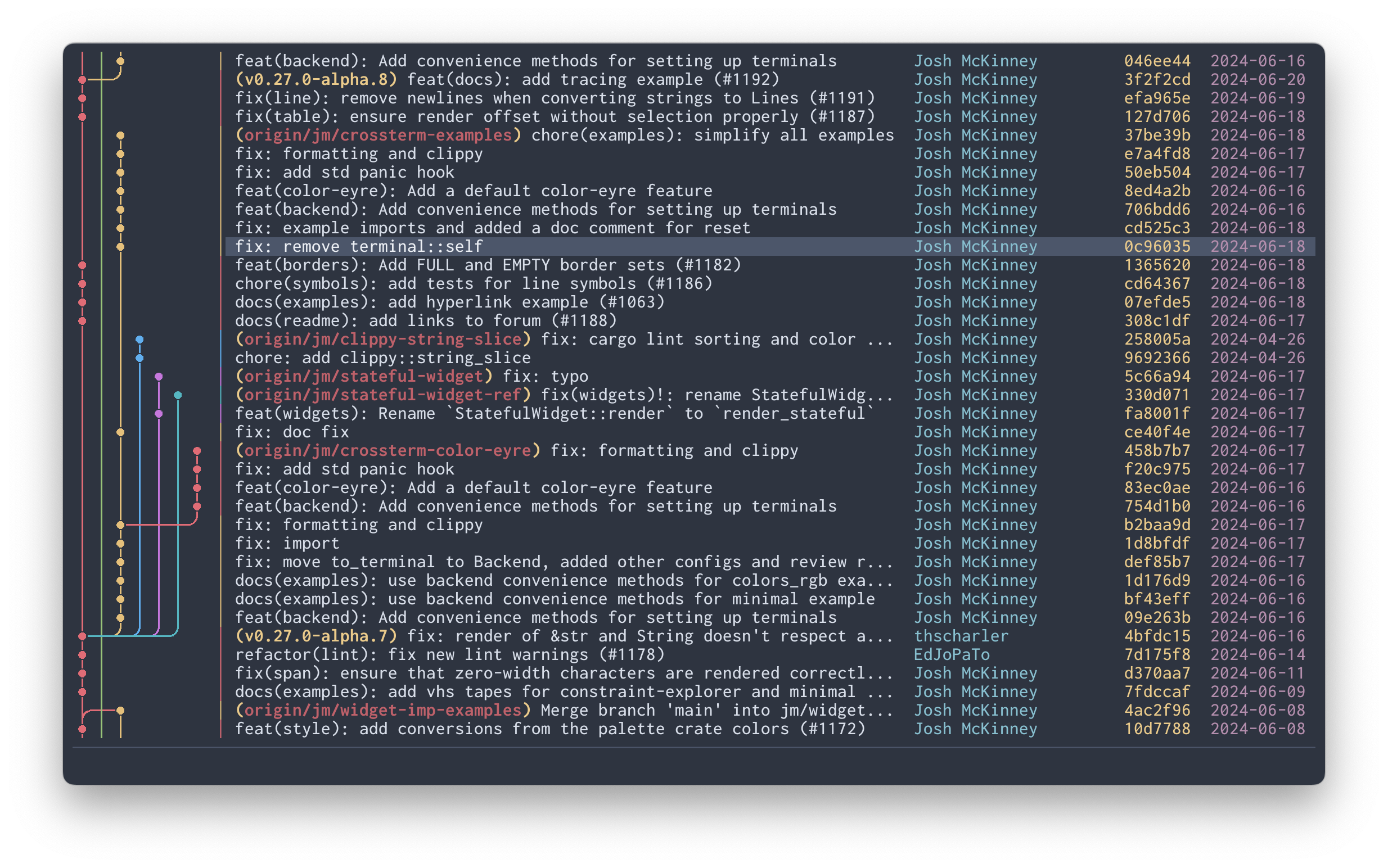
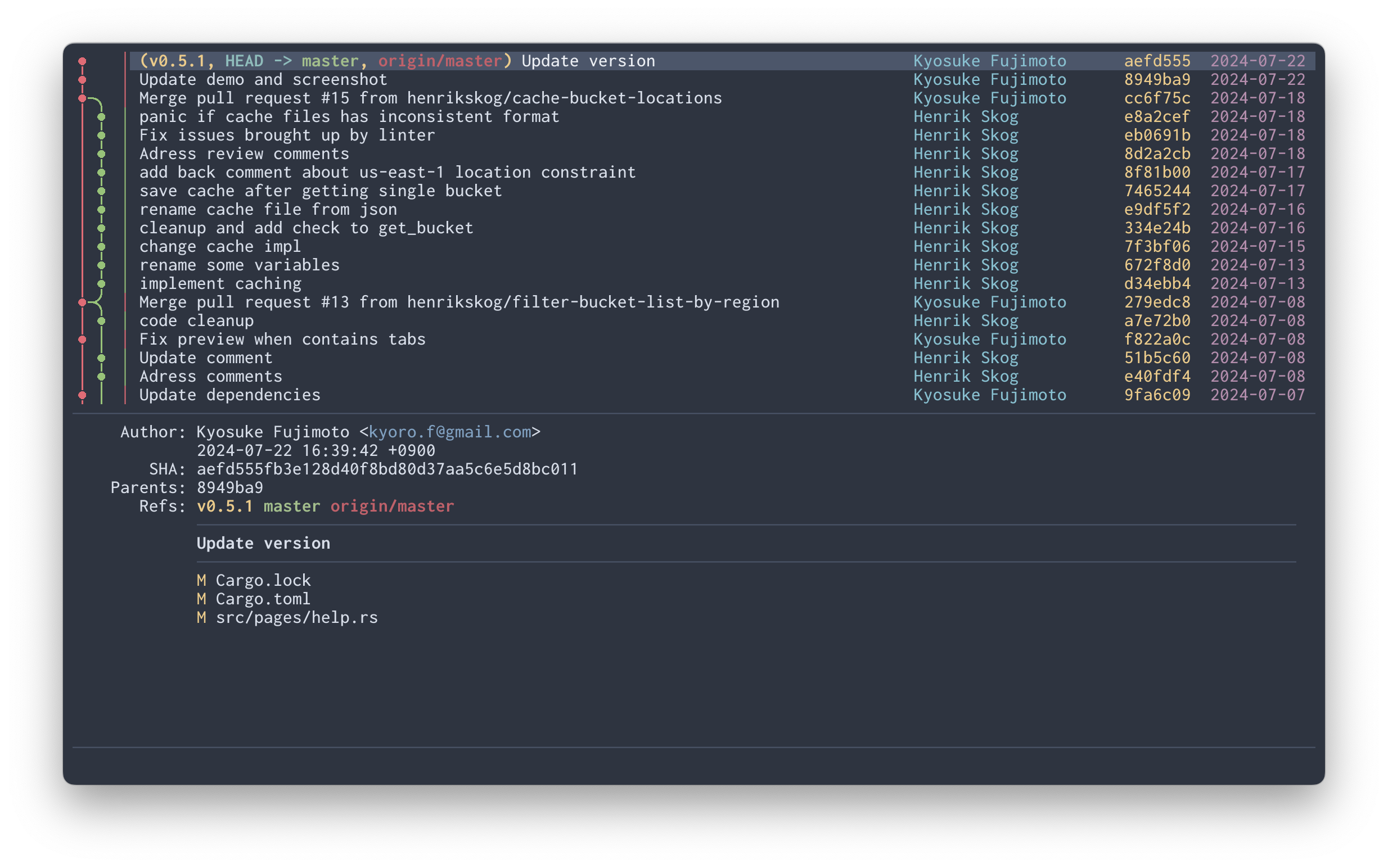
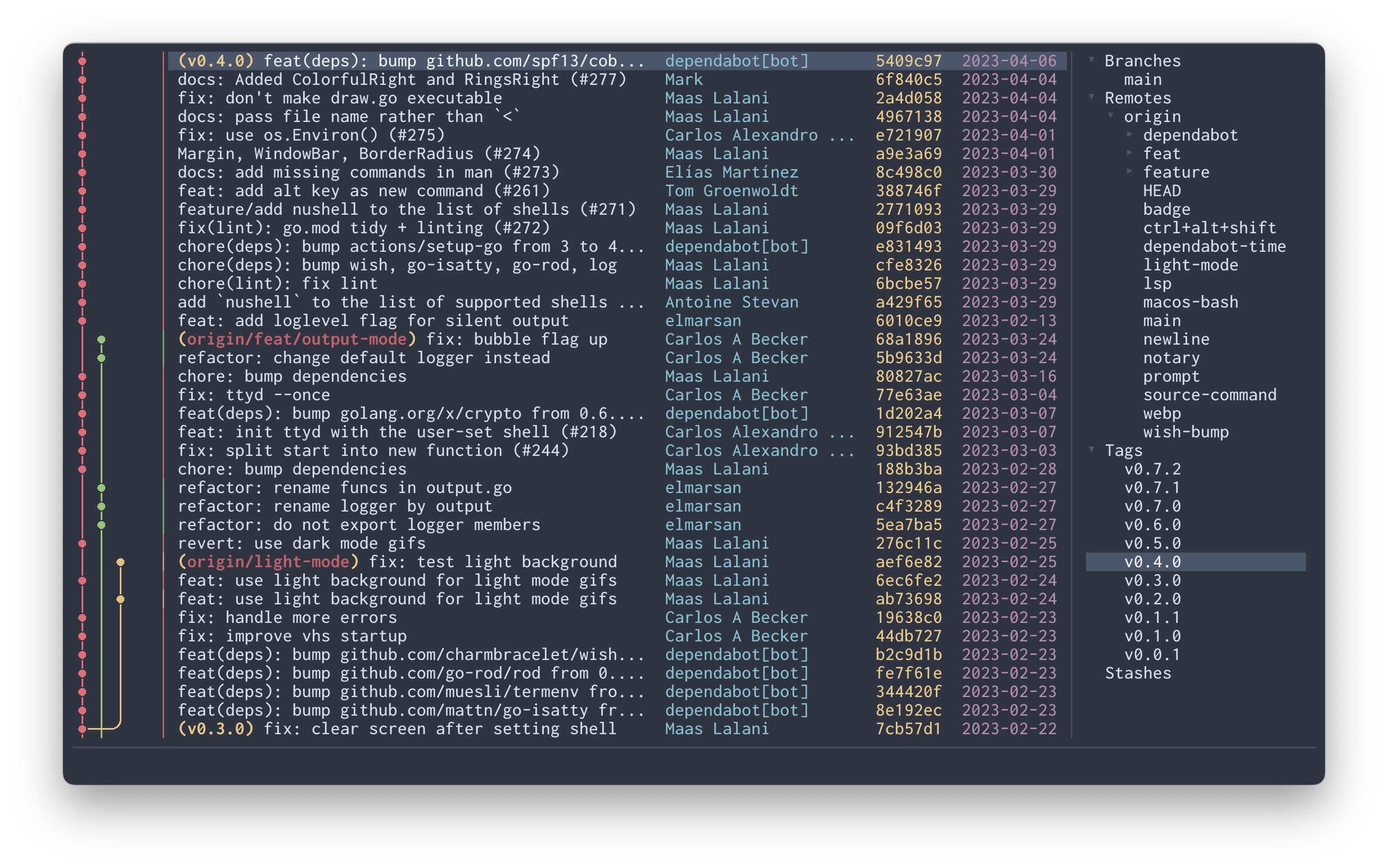
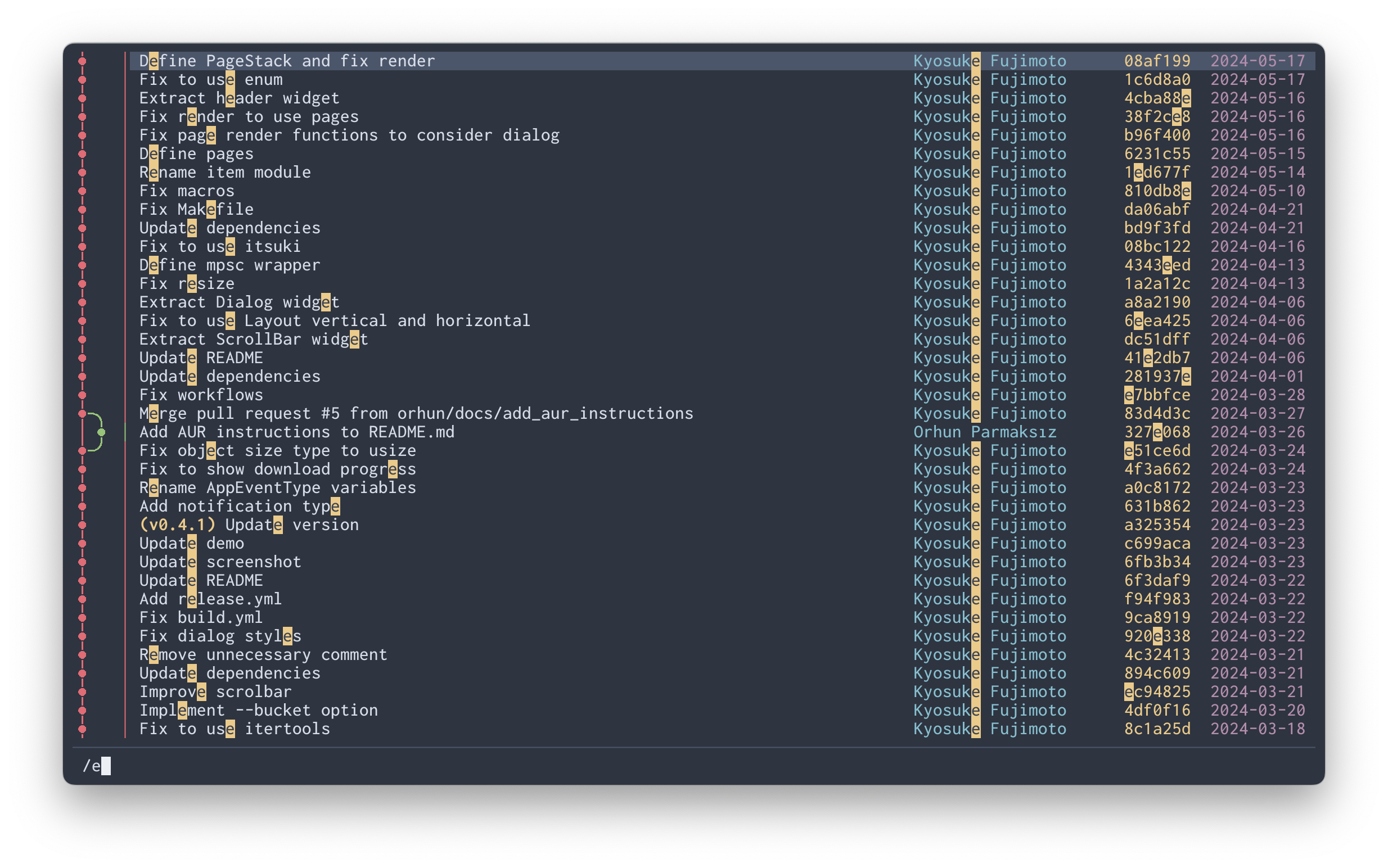
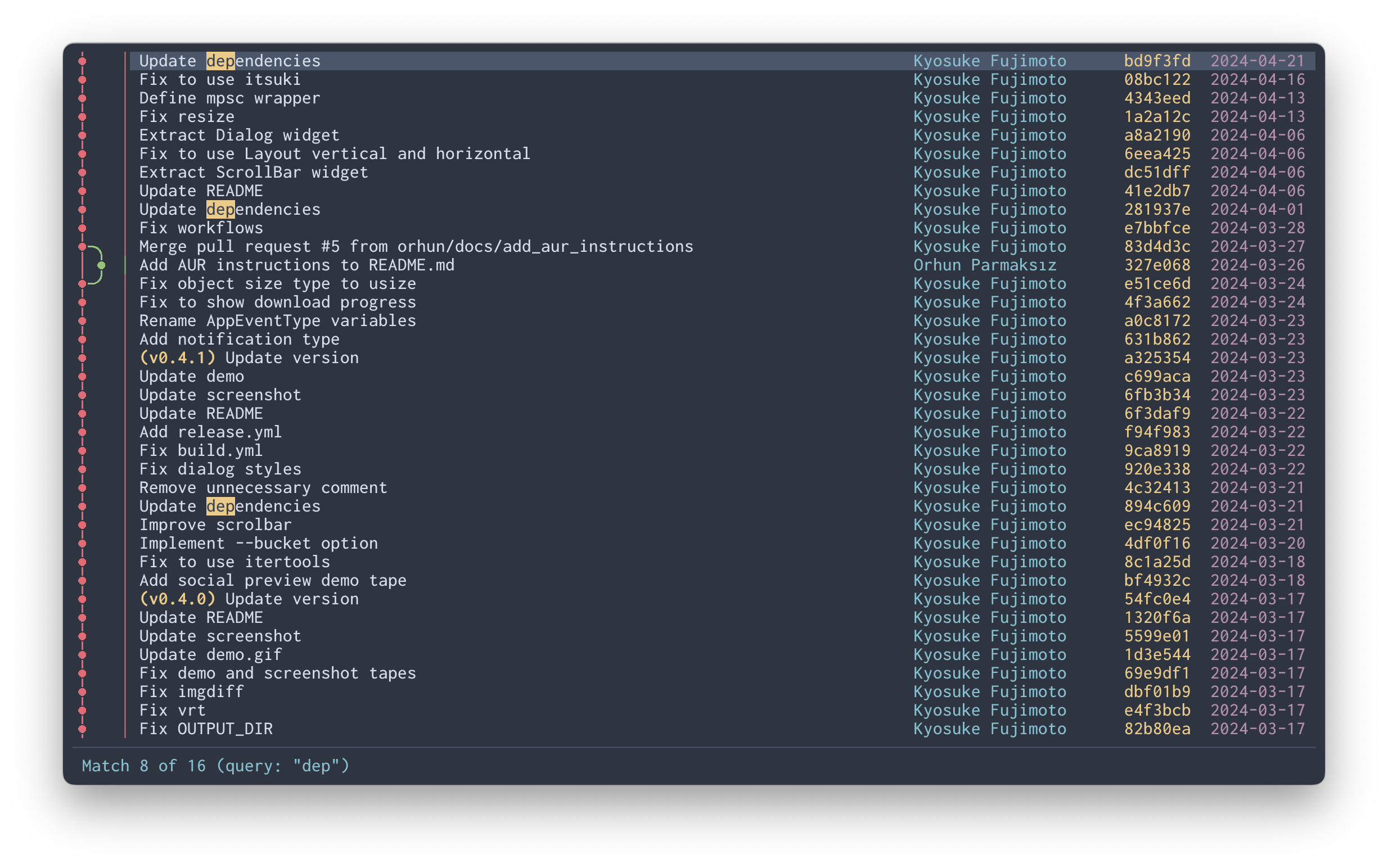
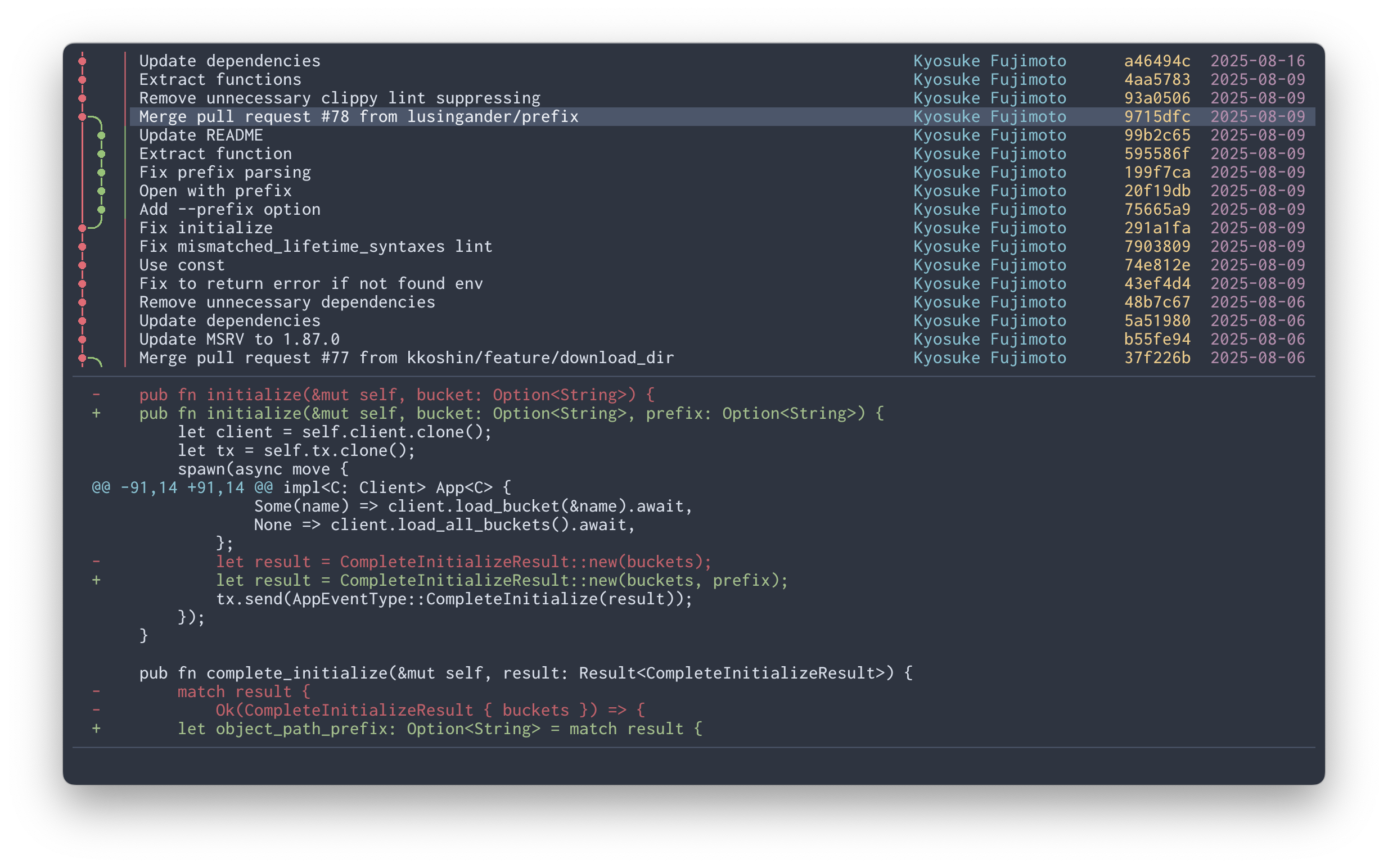
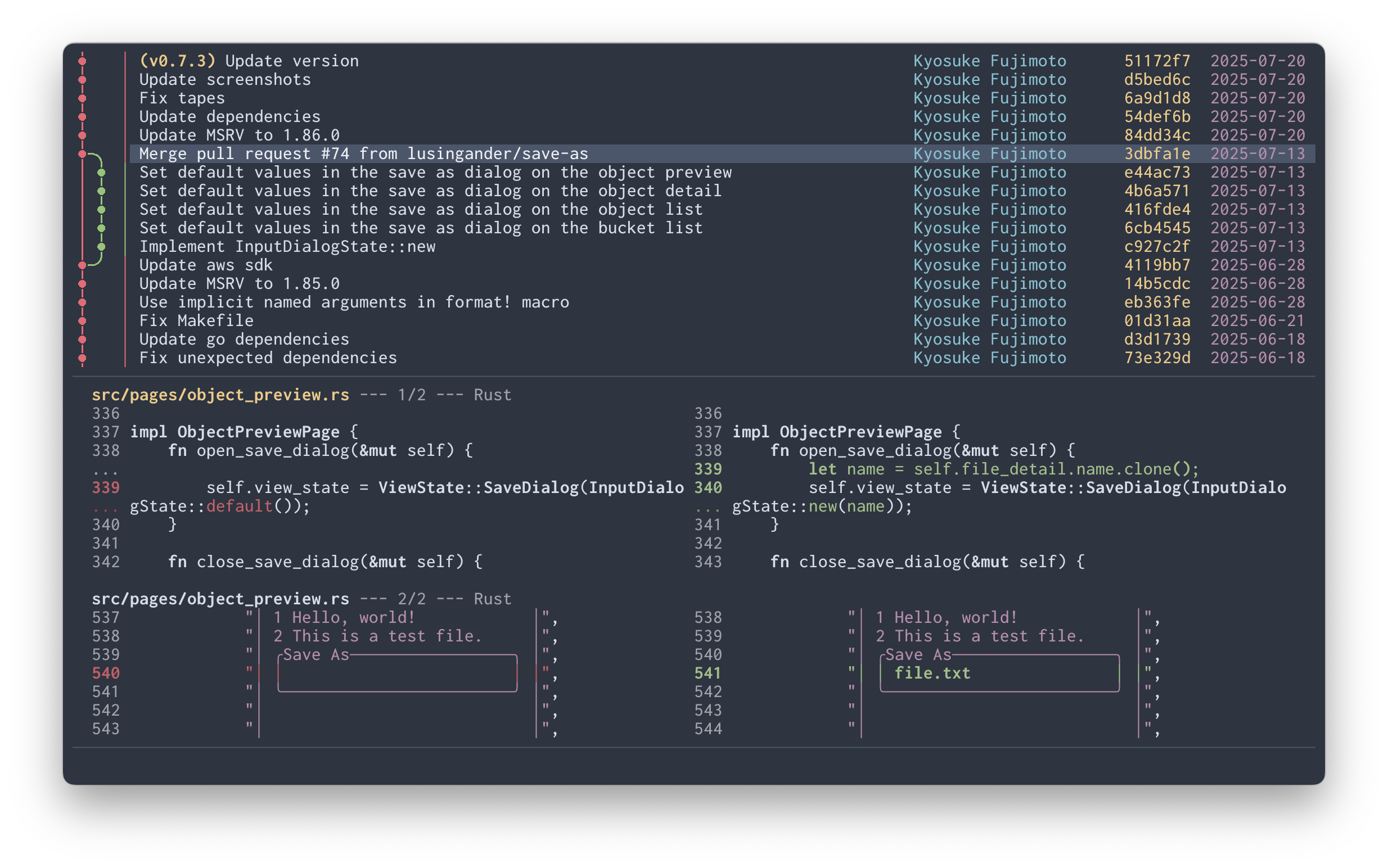
The following repositories are used as these examples:
FAQ
Why doesn't the graph display?
Serie displays graphs using specific terminal graphics protocols (such as Kitty and iTerm2 inline images).
If your terminal emulator doesn't support one of these protocols, Serie will not work — there is no fallback or workaround.
This is a fundamental requirement, not a limitation that can be worked around. For a list of supported terminal emulators and compatible environments, see Compatibility.
What are the advantages over other git TUI clients?
Compared to other git TUI clients, Serie offers the following advantages:
- High-quality graph visualization using terminal graphics protocols
- Simple and clean interface
On the other hand, Serie may not be for you if:
- You're satisfied with
git log --graphor the graph display in existing TUI clients - You need to perform complex git operations within a TUI client
How do I pronounce "Serie"?
It is pronounced as the German word Serie (/ˈzeːriə/), roughly like "ZAY-ree-eh", not like the English "series".